Customizing Your Checkout Page
The checkout page is a critical component of your sales funnel, where customers complete their purchase. PaidCommunities offers a powerful and flexible checkout page editor to help you create a branded, conversion-optimized experience.
Checkout Page Overview
Your checkout page includes:
- Product details and pricing
- Payment method selection
- Customer information fields
- Order summary
- Promotional code input
Checkout Design Editor
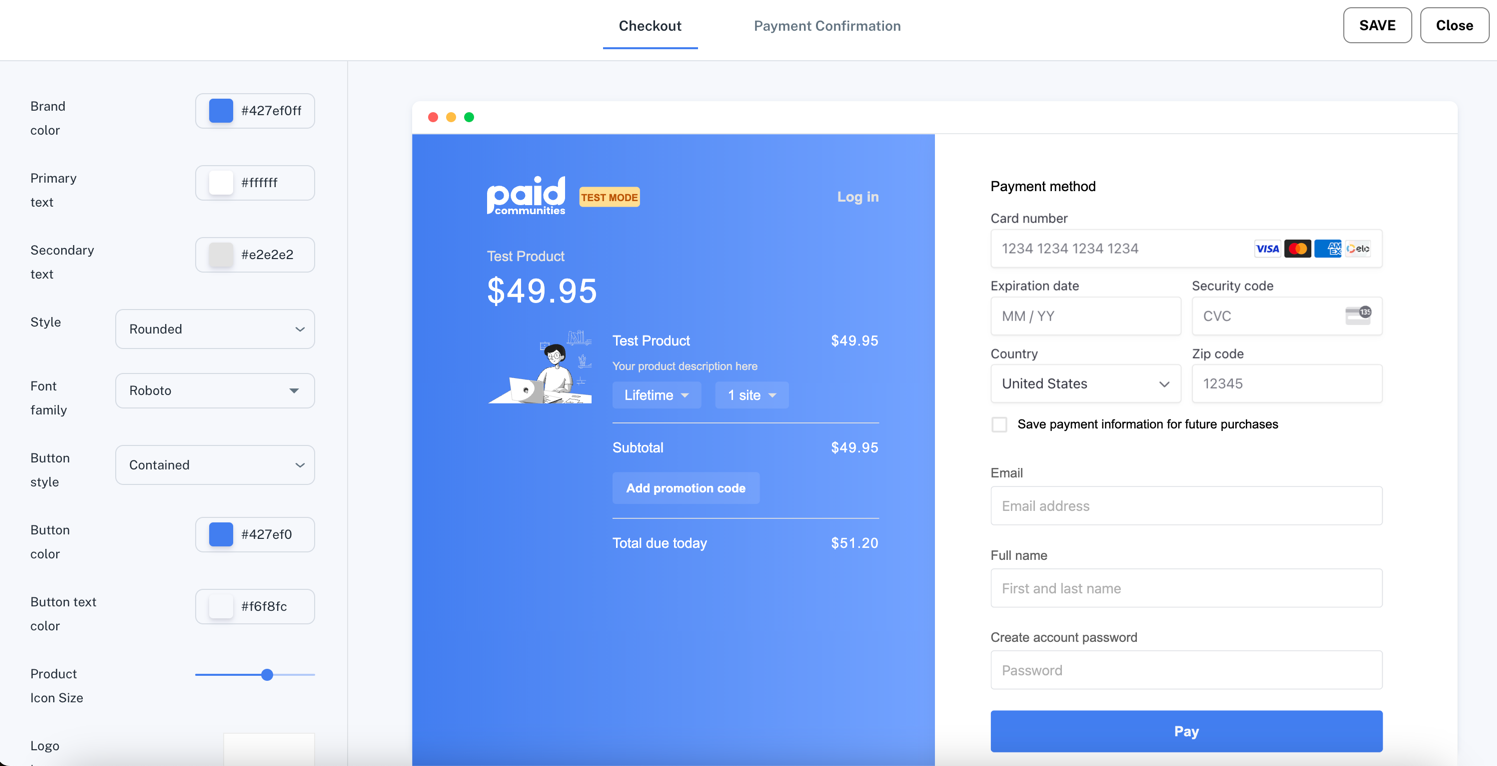
PaidCommunities provides an intuitive visual editor to customize your checkout page. Here's what you can modify:
- Brand Color: Set the primary color for your checkout page (#427ef0f1 in the example)
- Text Colors:
- Primary text color (#ffffff)
- Secondary text color (#e2e2e2)
- Style: Choose between rounded or square elements
- Font Family: Select from various font options (Roboto in the example)
- Button Style: Options like 'Contained' or 'Outlined'
- Button Colors:
- Button background color (#427ef0)
- Button text color (#f6f8fc)
- Product Icon Size: Adjust the size of your product icon
- Logo: Upload and position your company logo
Key Features to Note
- Live Preview: As you make changes, you'll see a real-time preview of your checkout page.
- Test Mode: The editor displays a "TEST MODE" banner to indicate you're in a testing environment.
- Responsive Design: The checkout page is designed to work well on both desktop and mobile devices.
- Payment Methods: The example shows support for major credit cards (Visa, Mastercard, Amex, Diners).
- Custom Fields: You can collect additional information like email and full name.
Advanced Customization
For users who need more control:
- Custom CSS: Advanced users can add custom CSS for pixel-perfect designs.
Custom CSS
You can use your browser's developer tools to inspect the checkout page to target specific CSS class names.
Best Practices
- Brand Consistency: Use colors and fonts that match your website's branding.
- Simplicity: Keep the design clean and focused on completing the purchase.
- Trust Signals: Include security badges and clear pricing information.
- Mobile Optimization: Test your design on various devices to ensure a smooth experience.
- A/B Testing: Use PaidCommunities' analytics to test different designs and optimize conversion rates.
By leveraging PaidCommunities' checkout page editor, you can create a seamless, branded purchasing experience that instills confidence in your customers and boosts conversions.